Make Brightspace coursework easier — grade prediction, dark themes, and interface customization for long study sessions.
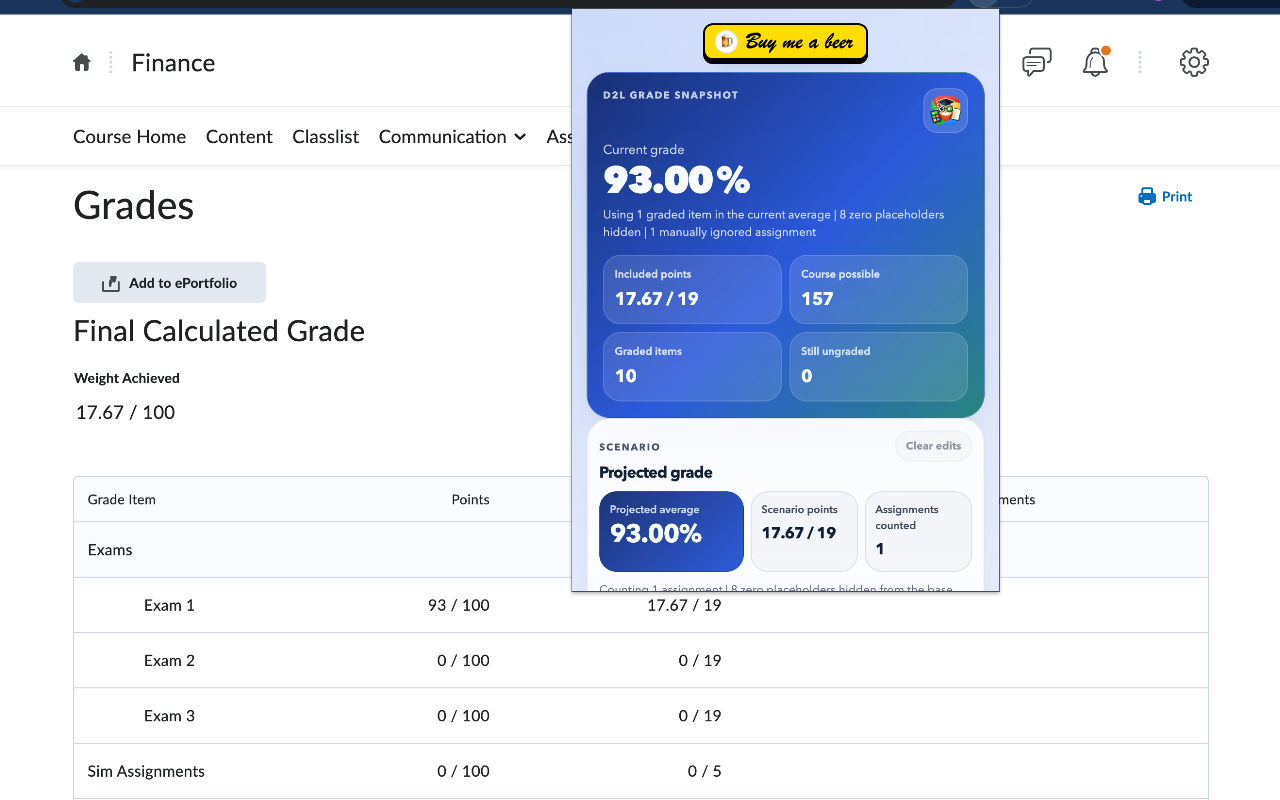
Chrome, 2K users, 5.0★ — scan current grades and simulate hypothetical scores
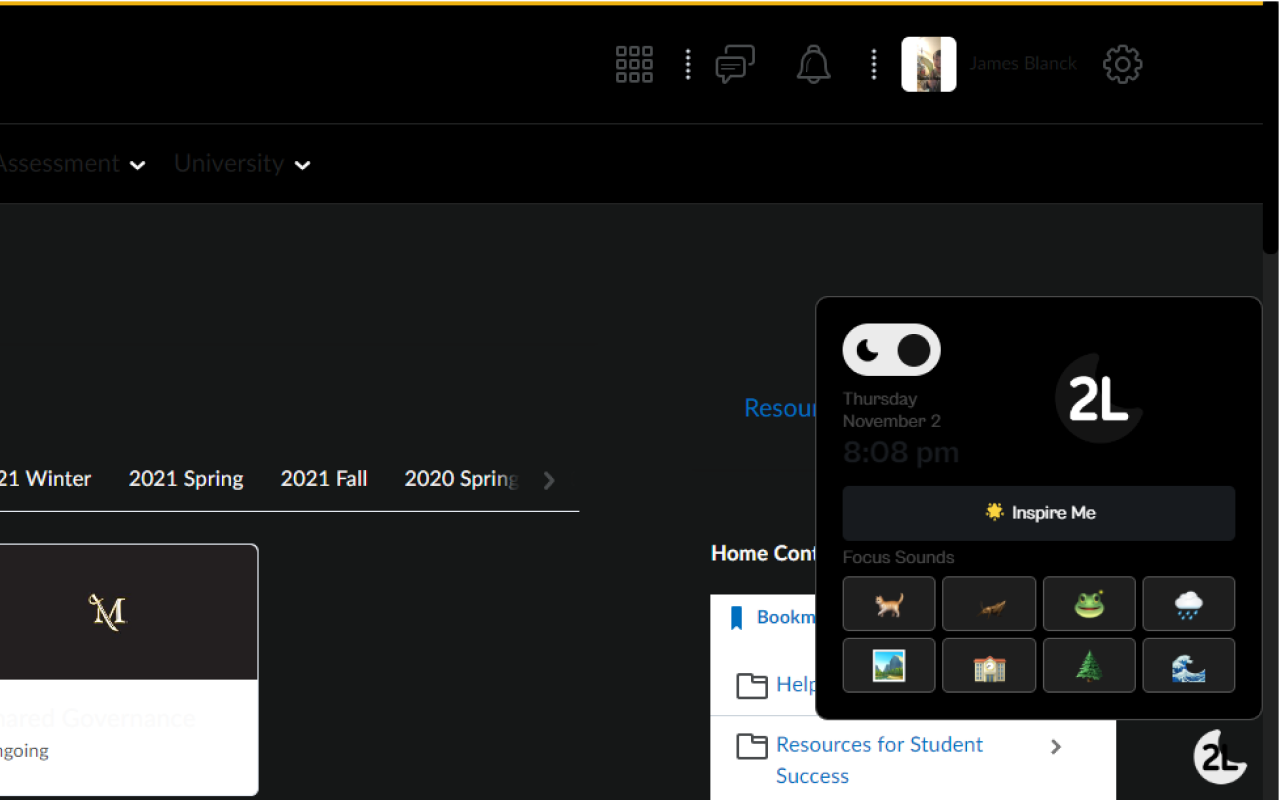
Chrome, 1K users, 4.5★ — dark theme for D2L with optional focus sounds
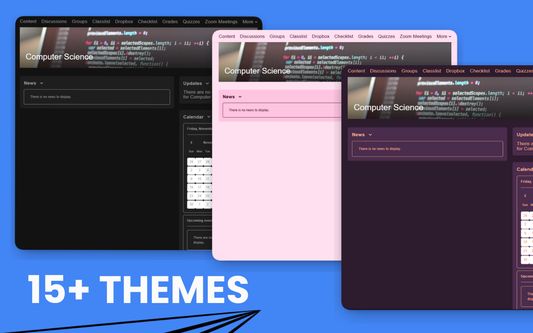
20+ themes, dark mode, custom fonts, and multi-school URL support
Side-by-side comparison of curated Brightspace / D2L extensions for Chrome and Firefox
| Name |

D2L Grade CalculatorChrome |
Dark2LChrome |
Desire2ImproveFirefox |
|---|---|---|---|
| 📊 Store Info | |||
| Rating | 5.0 ★★★★★ | 4.5 ★★★★★ | 3.3 ★★★ |
| Active Users | 2,000 | 1,000 | 122 |
| Last Updated | Mar 2026 | May 2024 | Nov 2025 |
| Install Size | ~600 KB | ~129 MB | ~27 MB |
| Primary Focus | Grade calc & prediction | Dark mode + focus sounds | Themes & layout |
| 📊 Grade & Academic Tools | |||
| Auto-import Current Grades | ✅ Yes | — | — |
| Hypothetical Grade Simulator | ✅ Yes | ❌ No | ❌ No |
| Weighted Categories | ✅ Yes | — | — |
| 🎨 Visual Customization | |||
| Dark Mode | ❌ No | ✅ Yes | ✅ Auto |
| Theme Library | — | 1 (Dark) | 20+ |
| Custom Fonts / Size | — | ❌ No | ✅ Yes |
| Focus / Ambient Sounds | — | ✅ Yes | ❌ No |
| Course Nicknames | — | — | ✅ Yes |
| 🔒 Privacy & Source | |||
| Runs Locally | ✅ Yes | ✅ Yes | ✅ Yes |
| Data Collection | Reads grade page | None | All-site access (themes) |
| License | Proprietary | Proprietary | MIT |
| Details | View Details ↓ | View Details ↓ | View Details ↓ |
A closer look at each Brightspace / D2L extension and what it covers
A lightweight calculator that reads your current Brightspace grade page and lets you simulate future scores. Enter a hypothetical grade on an upcoming assignment or final exam, and the extension re-computes your course total using the weighted categories already set up by your instructor — useful for figuring out the minimum score needed to hit a target grade. Runs entirely in your browser; no account, no server upload.
A dark-theme overlay built specifically for Brightspace / D2L, aimed at students studying in low-light conditions. In addition to the dark palette, the extension bundles a small library of ambient focus sounds (rain, café, white noise) that can be toggled from the extension popup. Note the install size is larger than most extensions (~129 MB) because the sound files are bundled rather than streamed — worth considering if storage is tight.
An open-source (MIT) Firefox add-on that reskins Brightspace / D2L with 20+ themes, automatic dark mode, custom fonts, adjustable font size, and per-course nicknames. Designed to work across multiple school URLs rather than being locked to a single institution. The user base is small (122 active users) and the rating reflects mixed feedback — install expectations accordingly, but the source is on GitHub and the feature scope is broad.
Review permissions, screenshots, update date, and recent reviews before installing any extension or add-on.
Some universities restrict third-party tools that modify the Brightspace interface or read grade data. Check your institution's acceptable-use policy before installing.
These are independent browser-store listings, not maintained by D2L Corporation or your school. D2L and your institution are not responsible for their behavior.
Workflow improvements that don't require any extension at all.
Brightspace's grade book uses weighted categories set by your instructor — for example, homework might be worth 30% while a final exam is worth 40%. Your visible "Final Calculated Grade" is the weighted average of everything graded so far, but it does not automatically project what you need on remaining work to reach a target grade. Three approaches help:
Brightspace does not ship a native student-facing dark mode, and institutional themes are usually locked by your school. The workable options are browser-level rather than D2L-specific:
prefers-color-scheme media query if your instructor uses modern HTML blocks. Partial coverage only.The Brightspace "My Courses" widget on the homepage lists every enrolled course, and by mid-semester most students have a mix of current, past, and pre-registered items. A few habits reduce visual clutter more than any extension:
Brightspace sends notifications for announcements, grades, discussion replies, and assignment feedback, but the defaults are often too verbose or too quiet. Fine-tuning takes five minutes:
All three extensions are built to target standard Brightspace / D2L page structures. Because each institution hosts its own Brightspace URL and can enable or disable certain tools (like the What-If grade view), some features may behave differently school-to-school. Desire2Improve specifically supports adding multiple school URLs, which helps students whose institution uses a non-default domain.
Yes. All three listings — D2L Grade Calculator, Dark2L, and Desire2Improve — are free to install with no paid tier or premium features. Only Desire2Improve is explicitly open source (MIT). Always verify on the official store page before installing, and review the permissions requested.
The calculator reads the weighted categories and current scores from your visible Brightspace grade page and applies the same weighting formula your instructor configured. It is not an official D2L tool, and its accuracy depends on whether your instructor uses weighted grades versus points-based grades, whether extra credit is configured, and whether any manual grade adjustments have been made. Treat its numbers as estimates, not as official course totals.
Most of the install size is the bundled ambient-sound library (rain, café, white noise). Dark2L ships these as local audio files so that focus sounds work offline and don't rely on streaming. If you only want the dark theme and do not care about the audio layer, a smaller alternative like Dark Reader with a Brightspace-specific color preset achieves similar visual results without the audio payload.
No. All extensions listed here are independent third-party projects published on the Chrome Web Store or Mozilla Add-ons. They are not developed, endorsed, or maintained by D2L Corporation or any specific educational institution. Always review permissions before installing, and uninstall if you notice any unexpected behavior on the grade book or assignment pages.
D2L ships monthly continuous-delivery updates to Brightspace, and each release can change DOM structure or class names. An extension that worked last term may need a patch after an update. If this happens, check the extension's store page reviews or (for open-source listings like Desire2Improve) the GitHub issue tracker; disable the extension temporarily until a fix lands. The Grade Calculator in particular is sensitive to grade-book layout changes.
We also review browser extensions for other learning management systems.